

Face Blurring Effect: How It Works & How to Apply It (2026)
You've probably been in this situation already.
If you just need the result, apply the effect directly with the free blur face online tool — automatic AI detection, no watermark.
You have a strong piece of footage. A customer testimonial shot on a busy street. A documentary clip from a protest. CCTV from a public building. The story matters, but so do the people in the background who never agreed to be part of it.
That's where the face blurring effect stops being a small editing trick and becomes a privacy decision. You're not just cleaning up visuals. You're deciding who stays identifiable, who doesn't, and whether the result is safe enough for publication, sharing, or internal review.
Tools like Blurit are built for exactly this kind of decision: automatic face detection, manual review, and browser-based processing that keeps your files under control.
Used well, face blurring helps you protect identity while keeping the scene understandable. Used poorly, it can create a false sense of safety. Some blur methods are easy to reverse in practice. Some interfere with AI analysis. Some are fine for low-risk content but weak for sensitive reporting.
The Rise of the Face Blurring Effect in Modern Media
A journalist edits footage from a city council meeting. A marketer cuts together customer interviews recorded at an event. A public agency prepares video for release after an incident review. All three run into the same problem. The main subject is usable, but other people's faces are visible.
In older workflows, that meant frame-by-frame masking in a video editor. It worked, but it was slow and easy to get wrong. Miss a few frames and the person's face flashes into view. Blur too much and the clip becomes distracting. Blur too little and identity may still be obvious.
The face blurring effect has become the practical answer because modern media is full of incidental faces. Phones record everywhere. Teams publish faster. Legal and ethical review now happens inside everyday content workflows, not just inside broadcast newsrooms.
Why this matters beyond editing
Face blurring isn't only for investigative reporting or police footage. It shows up in ordinary work:
- Marketing teams use it when event footage includes bystanders or children.
- Documentary crews use it to protect vulnerable sources and people in risky environments.
- Security teams use it when sharing footage outside tightly controlled internal systems.
- Public sector staff use it when balancing transparency with privacy obligations.
The common thread is simple. You want to preserve the scene, but remove the person's identity from it.
Privacy work often looks mundane on the surface. In practice, it's a chain of small decisions that determine whether a person can still be recognized.
Why the topic has become more technical
What changed is not just volume. It's the stakes.
Today, people don't only ask, "Can I blur this face?" They also ask harder questions:
- Will this still be recognizable after export?
- Can modern deblurring recover detail?
- Will the blur break pose analysis or motion review?
- Is pixelation enough, or should I mask instead?
Those aren't niche concerns anymore. They're routine for journalists, brand teams, compliance officers, and developers building privacy into products.
What Exactly Is a Face Blurring Effect?
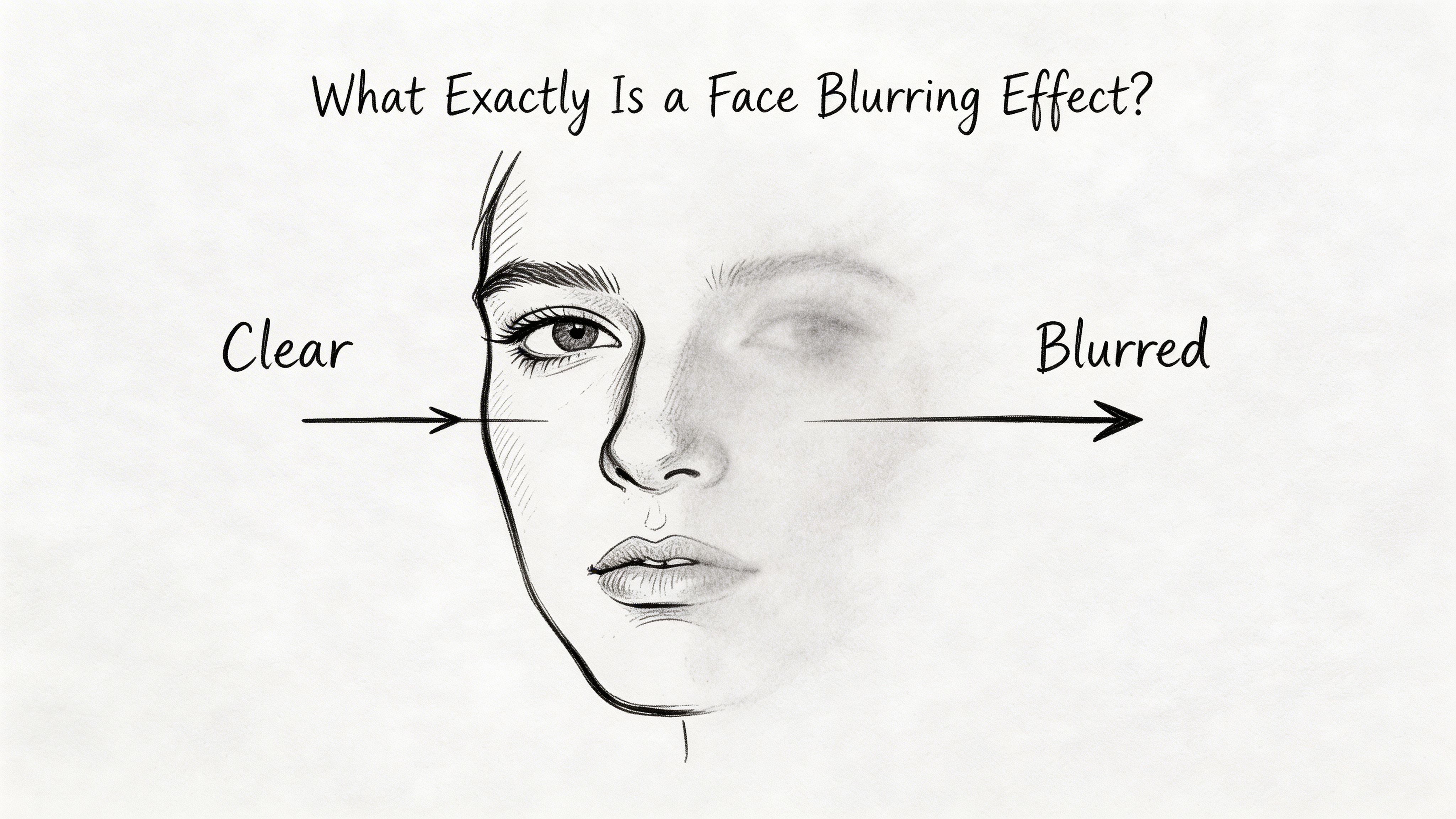
The face blurring effect (sometimes shortened to face blur effect) is a digital method for obscuring facial features so a person is harder, or ideally impossible, to identify. In plain language, software finds the face and applies an effect over that area.
It's similar to frosted glass on one window pane. The room is still visible. You can still tell someone is standing there. But the details that reveal identity are hidden.
That's different from cinematic blur used for style. A shallow depth-of-field effect makes a scene look polished. A privacy blur is meant to block recognition.
It's anonymization, not decoration
This point often causes confusion. A blur can look obvious to the eye and still be weak from a privacy standpoint.
If the blur is too light, too tight around the face, or inconsistent from frame to frame, the person may still be recognizable from:
- Facial structure
- Hairline and hairstyle
- Head movement
- Context in the scene
- Adjacent unblurred features
A privacy-focused face blur effect aims to reduce identity signals, not just soften the image.
What gets obscured
Most tools target the facial region first because that's the most direct identifier in visual media. In some workflows, editors also obscure nearby features when needed.
Examples include:
- Full-face blur when the person must not be identifiable at all
- Eyes-only blur in lower-risk contexts
- Solid masking when irreversible concealment matters more than aesthetics
- Selective blur when one person should remain visible but everyone else should be hidden
The right choice depends on purpose. A brand video may prioritize a natural-looking scene. A whistleblower interview may prioritize irreversible concealment.
Why blur works at all
A useful clue comes from neuroscience. A study in Social Cognitive and Affective Neuroscience found that blurring faces reduced the N170 brain response associated with face processing, especially over left occipito/temporal sites, showing that blurring changes how the brain processes identity in visual media (2018 SCAN study).
That doesn't mean every blur is automatically safe. It means face blurring changes identity perception at a fundamental level, which is exactly why it's used for anonymization.
Practical rule: If your goal is privacy, judge the effect by whether identity is still recoverable, not by whether the blur "looks blurred."
Key Reasons to Use Face Blurring for Privacy and Compliance
The first reason is obvious. A face is personal data in many real-world contexts. If your footage includes identifiable people who didn't agree to appear, publishing it can create legal, ethical, and reputational risk.
The second reason is less obvious. Once a face appears in a video, it tends to travel. Teams repost clips, crop thumbnails, extract stills, and feed assets into platforms that weren't part of the original plan. Blurring early reduces the chance that identifiable material spreads farther than intended.
Privacy law is only part of the story
People often frame face blurring as a compliance checkbox. It's more than that.
For privacy teams, it supports data minimization. For journalists, it protects sources, minors, and bystanders. For brands, it helps avoid turning a harmless background appearance into a complaint.
Here's the practical logic:
- If identity isn't needed, don't expose it.
- If the story needs context but not the person's face, blur the face and keep the scene.
- If the person could be harmed by recognition, use a stronger anonymization method.
Common use cases by role
Different teams use the same technique for different reasons.
| Role | Why they blur faces | What they care about most |
|---|---|---|
| Journalists | Protecting vulnerable people and uninvolved bystanders | Safety and ethics |
| Marketers | Using real-world footage without exposing non-participants | Brand risk and consent |
| Security teams | Sharing or reviewing footage while limiting exposure | Controlled disclosure |
| Public agencies | Releasing material without identifying unnecessary individuals | Privacy and accountability |
Compliance is about process too
Applying a face blurring effect doesn't magically make a workflow compliant. The wider process matters.
Ask these questions:
- Who had access to the original footage
- Where the unblurred version is stored
- Whether the blurred version is the only one distributed
- Whether the anonymization is strong enough for the intended audience
A weak blur in a messy workflow can still fail privacy expectations.
Ethical use is often stricter than legal use
A newsroom might be legally allowed to show a face in some situations and still decide not to. A company may have a lawful basis to process footage internally and still blur people before sharing clips outside the team.
That's good practice. It reduces unnecessary exposure.
If someone's identity adds nothing to your message, showing their face is usually a privacy cost without a reporting or business benefit.
How Automated Face Detection and Blurring Works
Automated blurring sounds more mysterious than it is. In most tools, the workflow has two parts. First, the software finds faces. Then it applies an obscuring effect to those detected regions.
That's it. The complexity sits inside the detection step.
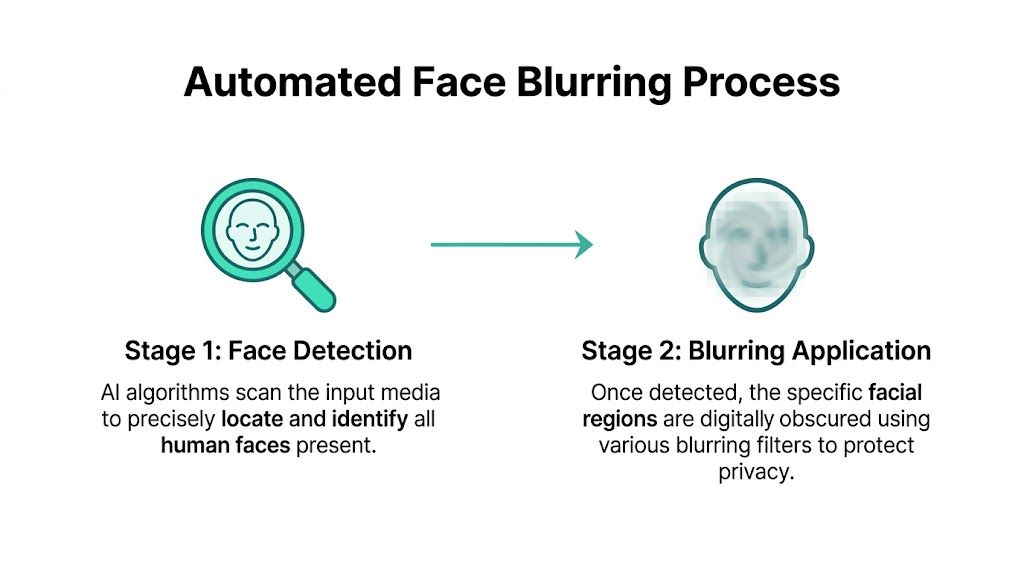
Stage one detects where the face is
A good analogy is a security guard scanning a crowd for familiar patterns. The software looks for visual cues that suggest a face is present, then marks the region so the effect can follow it across frames.
A patent describing automated face blurring outlines a precise version of this process. It uses outline-based methods to estimate facial regions with ellipses, then outputs coordinates for those regions in steps 450 to 460 so a dedicated blurring process can target only detected faces (US6959099B2 face blurring patent).
That matters because the blur only works if the software knows where to place it.
Stage two applies the chosen effect
Once the system has coordinates, it can obscure the area using different visual methods. The most common are:
- Gaussian blur, which softens detail smoothly
- Pixelation, which turns facial detail into visible blocks
- Masking, which covers the area with a solid shape or opaque overlay
Each has a different feel. Gaussian blur tends to blend into footage. Pixelation makes the censorship more obvious. Solid masking is usually the most visually blunt.
Why tracking matters in video
Still images are simple. Video is where things get harder.
Faces move. People turn sideways. Lighting changes. Someone passes behind another person. If the blur doesn't follow the face accurately, privacy fails in the gaps.
That's why automated systems do more than detect a face once. They keep checking where the face is, frame by frame or sequence by sequence, and update the blur region accordingly.
Where users still need judgment
Automation helps, but it doesn't remove human review.
You still need to check:
- Missed faces in the background
- False detections on posters, mannequins, or screens
- Blur boundaries that are too tight
- Whether a stronger effect is needed for sensitive material
A face detector answers "where is the face?" It doesn't answer "is this anonymized enough for the risk I'm taking?"
The practical takeaway
If detection is inaccurate, every other part of the workflow suffers. A beautiful blur effect applied to the wrong area is useless. Reliable anonymization depends on accurate detection first, then a blur method that fits the sensitivity of the content.
Comparing Blurring Methods and Technical Trade-offs
Not all face blurring methods solve the same problem. Some are optimized for readability. Some are optimized for obvious censorship. Some are safer against recovery attempts than others.
If you compare them only by appearance, you'll miss important trade-offs.
Blurring method comparison
| Method | Visual effect | Irreversibility | Best for |
|---|---|---|---|
| Gaussian blur | Soft, natural-looking concealment | Can be weaker against recovery if applied lightly or on low-motion footage | General publishing where scene readability matters |
| Pixelation | Blocky mosaic effect | More explicit visually, but not automatically stronger than other methods | News, public-facing content, obvious anonymization |
| Solid mask | Opaque cover over the face | Strong practical concealment because no facial detail is shown | High-risk identities and irreversible redaction |
| Differential privacy-based blurring | Privacy-focused transformation designed to resist detection better | Stronger resistance in the cited research than standard Gaussian or box blur | High-stakes anonymization and adversarial settings |
The comfort trap of familiar effects
Gaussian blur is popular because it looks polished. Editors like it because it preserves the mood of the footage. The problem is that visual elegance doesn't equal strong anonymization.
Research on anonymization attacks notes that modern deblurring using GANs can recover facial details from low-motion blurred video, and that differential privacy-based blurring offered superior resistance to detection algorithms like OpenCV compared with standard Gaussian or box methods (research summary on blur resistance and deblurring attacks).
That's the key trade-off. A face blur effect can look professional while still being a weak defense against technical reversal.
What changes when AI analysis matters
There's another trade-off most guides skip. Sometimes you want privacy and machine readability at the same time.
Examples include:
- workplace ergonomics review
- movement analysis in training footage
- security workflows that rely on body motion rather than identity
In those settings, the blur method may affect downstream computer vision. Some face blurring approaches preserve utility better than others, especially when the analysis depends on head-adjacent keypoints or upper-body motion.
A practical way to choose
Don't ask which method is "best" in the abstract. Ask what failure matters most.
Use this decision lens:
- If viewer comfort matters most, start with Gaussian blur and verify it's strong enough.
- If you want the audience to clearly see that anonymization happened, pixelation works well.
- If identity exposure would create serious harm, solid masking is often the safer practical choice.
- If you expect technical scrutiny or adversarial attempts, look for methods tested against detection and deblurring, not just methods that look obscured.
Three mistakes professionals make
They treat all blur as equally irreversible. It isn't. Some methods leak more recoverable structure than others.
They size the blur too tightly. A perfectly centered blur can still leave enough context around the face to support recognition.
They optimize for aesthetics first. That's understandable in branded content. It's risky in sensitive work.
The right anonymization method is the one that survives your worst plausible use case, not the one that looks nicest in the edit bay.
A Practical Workflow for Applying Face Blurring with Blurit
A practical workflow should be fast enough for daily use and controlled enough for sensitive material. That means you need three things: automatic detection, manual correction, and an export process that matches the risk of the footage.
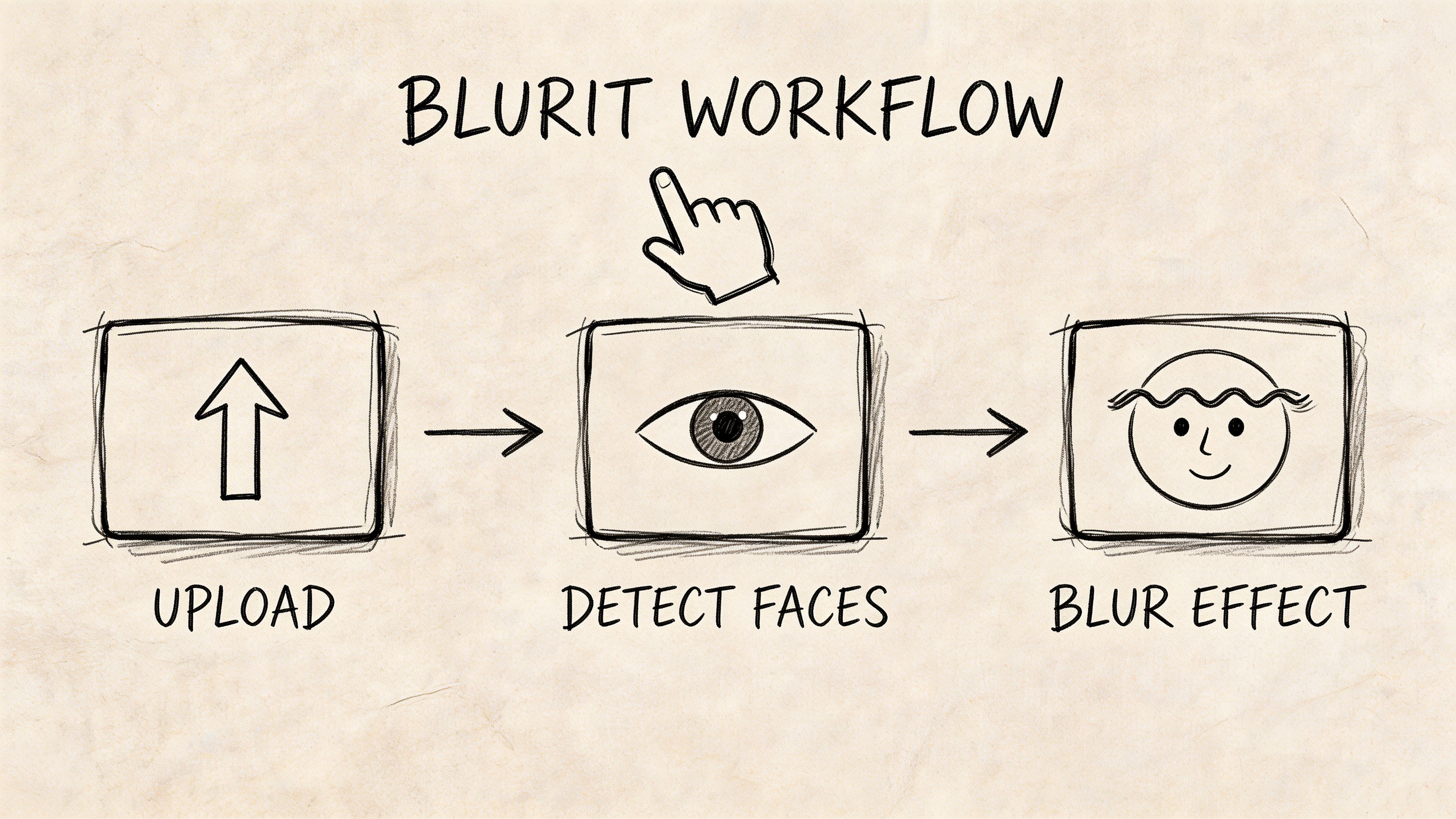
Step one: upload and scan
Start by uploading the photo or video into a tool that supports automated detection. Browser-based workflows are useful here because they remove the need to install a heavy editor just to anonymize a clip.
When the scan runs, review the first pass instead of assuming it caught everything. Background faces, reflections, and faces on screens are the most common places to check manually.
Step two: review detections and adjust
This is the part many users rush. Don't.
A good review pass includes:
- Checking every visible person in wide shots
- Looking at transitions where people enter or exit frame
- Expanding blur zones if hairline or profile details remain visible
- Keeping key subjects unblurred only when you have a clear reason
A tool with canvas-based edits can help here. You want to be able to add, remove, or refine regions without restarting the workflow.
One example is Blurit, a browser-based anonymization tool that supports automatic detection for faces and other sensitive elements, plus manual adjustments, selective blur modes, and export for photos and videos.

Step three: choose the effect for the actual risk
Don't pick the effect based on habit alone.
Use a simple rule set:
- Low-risk promo footage. A softer blur may be enough if you're hiding incidental bystanders.
- Journalistic or documentary footage. Pixelation or stronger masking may be more appropriate when viewers should immediately understand that a person is being protected.
- Sensitive review footage. Choose a method that prioritizes concealment over visual polish.
Step four: check whether analysis must survive
This matters in security, operations, and movement review.
A 2022 study found that face blurring had a minimal but statistically significant impact on automated human pose estimation. Most joint angle variations stayed under 1°, with shoulder flexion at 0.6°, while confidence levels for key points near the face dropped (pose estimation study on blurred faces).
That suggests a practical rule. If you need to preserve motion or posture analysis, use selective blur modes and test the output rather than assuming privacy edits are neutral.
Step five: export the blurred version, not just the project
A common operational mistake is to finish the anonymization but keep circulating the original file internally. That defeats the point.
Your team should know:
- which version is approved for sharing
- where the unblurred original is stored
- who can access it
- when it should be deleted or archived
For highly sensitive work, shorter retention and limited access matter as much as the blur effect itself.
Here's a short product demo if you want to see what an automated browser workflow looks like in practice.
A simple API pattern for developers
If you're building anonymization into a product workflow, the logic is similar to the manual process:
- send media for detection
- review returned regions or metadata
- apply the chosen obfuscation mode
- store or deliver only the approved output
A minimal example might look like this conceptually:
- Upload the file to your processing endpoint.
- Request face detection.
- Apply your selected method, such as blur, pixelation, or mask.
- Return the processed asset to the application.
The important design choice isn't the syntax. It's the policy layer around it. Decide which effect to apply by default, when to allow manual override, and whether some categories of footage require stronger masking.
Strong anonymization workflows combine automation with review. Speed matters, but review is where privacy actually gets enforced.
Blurring Faces Responsibly in Your Content
The face blurring effect is simple to describe and easy to misuse.
At its best, it lets you keep the value of a scene while removing identity from it. That's useful for journalism, marketing, security review, and public communication. But "blurred" isn't the same as "safe." The method matters. The workflow matters. The surrounding controls matter.
What responsible use looks like
Responsible use usually means three habits:
- Choose the method by risk, not by what looks nicest.
- Review automated detections manually, especially in busy scenes.
- Control the original file, not just the exported one.
That mindset changes face blurring from an editing effect into a privacy control.
The bigger shift
A few years ago, anonymization felt like specialist work. Now it's ordinary work. More teams publish visual media, more organizations share footage across departments, and more creators need a way to protect people who didn't sign up to be visible.
That makes face blurring part of modern media literacy. If you produce or publish footage, you're making identity decisions whether you notice it or not.
Use the effect deliberately. Use stronger methods when consequences of identification are severe. And treat anonymity as something you verify, not something you assume.
Start with Blurit: no credit card, your files stay in your browser
Start for free
Up to 10 GB · 100% online
Frequently Asked Questions About Face Blurring
A quick rule helps here. Face blurring hides facial detail, but anonymization is broader. It asks whether a real person could still be recognized from everything else left in the frame.
Is face blurring always enough to anonymize someone?
No. Identity can survive outside the face through hair, clothing, tattoos, location, voice, or the event itself. In higher-risk material, the safer approach may combine face masking with audio treatment, cropping, or removal of other identifying cues.
Is pixelation safer than Gaussian blur?
The answer depends on your threat model. Pixelation works like a mosaic over the face, while Gaussian blur smears detail across neighboring pixels. One may look stronger to viewers, but appearance is only part of the question. What matters is how much recognizable information remains after compression, resizing, and any attempt to recover detail.
Can the face blur effect affect AI analysiså
Yes, and that trade-off is easy to miss.
A blurred face does not only change what a person sees. It can also change what a model sees. Researchers discussing downstream computer vision effects found that face blurring can reduce pose estimation accuracy and introduce errors across body points, including points beyond the face itself (study discussion on downstream computer vision effects). If your footage will be used for security review, medical analysis, or motion analysis, choose a method that protects identity without damaging the signals you still need.
Should I blur only the face or a larger area?
A slightly larger mask is often safer. Tight face-only blur can leave profile shape, hairline, ears, or skin markings visible. In practice, the blur area should match how recognition occurs in everyday situations, not just where a detector drew a box.
Is manual review still necessary if AI found all faceså
Yes. Detection answers "where is the face?" Privacy review answers "is this person still identifiable?" Those are different questions, and high-stakes publishing needs both.
What's the best method for journalism or high-risk storieså
Choose the method based on the consequence of being identified. If identification could expose a source, a patient, or a bystander to harm, use stronger masking and remove supporting cues around the face. In those cases, natural-looking footage matters less than resistance to recognition.
Can I keep one person visible and blur everyone else?
Yes. That is often the clearest editorial choice when one participant has agreed to appear and others have not. Selective blur is common in interviews, event footage, and public-space scenes where consent is mixed.
If you need a fast way to apply those decisions in real projects, Blurit supports anonymization for faces, license plates, and other sensitive objects in photos and videos. It includes automatic detection, manual adjustments, selective blur modes, and browser-based processing for teams building a practical privacy workflow.